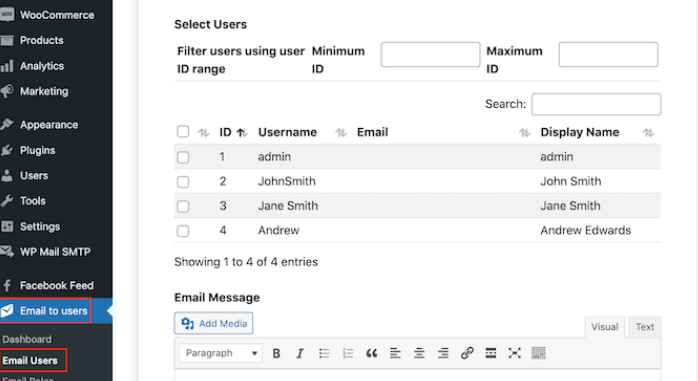
Send Users Email is a WordPress admin tool or plugin feature that lets a site owner email registered users directly from the dashboard, often by role, user status, or selected accounts. It matters because WordPress runs a large share of the web, with W3Techs reporting usage above 40% of all websites. For membership sites, course portals, stores, forums, and internal sites, that means user email is not a small side task. It is part of daily operations.
TLDR: Send Users Email helps WordPress administrators send messages to users without exporting lists or switching to a separate email platform. For example, a course site with 1,200 students could email only users with the Subscriber role about a new lesson, while skipping administrators and editors. If 18% of those users usually open site notices, that is 216 people reached from one dashboard action. It works best for simple alerts, account notices, and role-based updates, not full marketing campaigns.
What Does “Send Users Email” Mean in WordPress?
In WordPress, Send Users Email usually means sending an email to registered users from inside the admin area. It may refer to a plugin with that name, a similar user email plugin, or a built-in feature added by a membership, LMS, or community plugin.
The basic idea is simple. The administrator writes a subject line, adds a message, chooses recipients, and sends the email. Recipients can often be filtered by user role, such as Administrator, Editor, Author, Contributor, Subscriber, Customer, Member, Student, or custom roles created by plugins.
This is different from publishing a blog post or sending a newsletter. The message goes to user inboxes. It is direct. It is also easy to misuse, so setup and permissions matter.
Common Reasons to Email WordPress Users
WordPress sites collect users for many reasons. Some sites allow comments and accounts. Others run paid memberships, online courses, WooCommerce stores, support portals, directories, or private company hubs.
Send Users Email is useful for:
- Account alerts: password policy changes, login updates, profile reminders.
- Membership notices: renewal reminders, plan changes, benefit updates.
- Course updates: new modules, live class links, assignment deadlines.
- Store messages: customer updates, order policy changes, product recalls.
- Community messages: rule updates, event reminders, moderation notices.
- Internal updates: staff announcements on private WordPress intranets.
Honestly, it feels like a small task until the export CSV button fails, duplicate addresses show up, and a five-minute update turns into 40 minutes of cleanup. A direct user email tool avoids that mess for simple messages.
How Send Users Email Usually Works
Most tools follow a similar flow. The administrator opens the user email screen, selects the user group, writes the content, then sends or previews the message.
- Select recipients. The sender chooses all users, one role, multiple roles, or hand-picked users.
- Write the subject. A short, clear subject improves opens.
- Write the message. Some tools support plain text only. Others allow HTML formatting.
- Use placeholders. Fields like {first_name} or {user_login} may personalize emails.
- Send a test. A test email catches broken links and odd formatting.
- Send the campaign. The message is sent through WordPress mail or an SMTP service.
WordPress user roles control what users can see and do inside a site. Knowing those roles helps prevent the wrong group from getting the wrong email.
Send Users Email vs Newsletter Tools
Send Users Email is not always a replacement for Mailchimp, Brevo, ConvertKit, or other email marketing tools. It is better for site-related user communication. Newsletter platforms are better for visual campaigns, automation, segmentation, unsubscribe management, and reporting.
A simple rule works well:
- Use Send Users Email for account notices, user role messages, and admin updates.
- Use an email marketing platform for promotions, drip campaigns, lead nurturing, and branded newsletters.
- Use WooCommerce or membership email tools for order confirmations, receipts, and subscription billing notices.
The catch is that many WordPress email plugins look nearly identical. Some send messages well. Others quietly depend on the default server mail function, which can land messages in spam or never send them at all.
Key Features to Look For
A good Send Users Email tool should be simple, but not bare. The right feature set saves time and lowers risk.
- Role-based sending: Sends only to selected roles.
- Individual user selection: Useful for small groups or support cases.
- Test email option: Prevents embarrassing mistakes.
- HTML support: Allows links, lists, and basic formatting.
- Plain text fallback: Helps deliverability and readability.
- SMTP support: Improves sending reliability.
- Send logs: Shows what was sent and when.
- Permission controls: Limits access to trusted administrators.
- Unsubscribe handling: Needed for promotional or optional messages.
Best Practices for Emailing WordPress Users
Good user email is short, clear, and relevant. Users should know why the message was sent and what action is needed.
Subject lines should be specific. “Your course schedule changed” works better than “Important update.” A subject should not sound like clickbait. It should match the message.
Messages should be segmented. Administrators do not need student reminders. Customers do not need editor updates. Sending to everyone is easy, but it is often lazy.
Every message should have one purpose. If the goal is to update a password policy, that should be the whole email. Extra sales copy weakens trust.
Test before sending. Broken links, missing names, and strange spacing make a site look careless. A test email takes seconds and can prevent support tickets.
Keep records. A send log helps when a user claims no notice was sent. It also helps administrators track past announcements.
Deliverability: The Part Many Sites Get Wrong
WordPress uses the wp_mail() function to send email. That function depends on the hosting server unless another mail setup is added. Shared hosting is not always trusted by inbox providers. That is why password reset emails, alerts, and admin messages sometimes disappear.
For better delivery, many sites connect WordPress to an SMTP service. Common choices include SendGrid, Mailgun, Amazon SES, Postmark, Gmail SMTP, and Microsoft 365. These services authenticate messages and reduce the chance of emails landing in spam.
Administrators should also set up SPF, DKIM, and DMARC records for the sending domain. Those records tell inbox providers that the message is allowed to come from that domain. It sounds dull. It also prevents a lot of headaches.
Privacy and Permission Rules
Emailing registered users is not risk-free. A WordPress account does not always equal consent for marketing. Transactional notices, such as account security alerts, are usually different from promotional campaigns. Promotional emails may require consent, opt-out links, and regional compliance checks.
Site owners should review local laws, privacy policies, and plugin settings. They should also avoid exposing email addresses in the “To” or “Cc” fields. Bulk user emails should be sent in a way that hides recipient addresses.
When Send Users Email Is the Right Choice
Send Users Email is a strong fit when the message is tied to the user’s account or activity on the website. It is ideal for small and medium sites that need fast user communication without building a full campaign.
It is less suitable for large marketing blasts. A site with 50,000 users needs queue management, unsubscribe tracking, email analytics, bounce handling, and strict sending limits. A basic plugin may struggle there.
For many WordPress administrators, the best setup is a mix: a Send Users Email tool for user notices, an SMTP plugin for reliable delivery, and a marketing platform for newsletters.
FAQ
What is Send Users Email in WordPress?
It is a tool or plugin feature that lets administrators email registered WordPress users from the dashboard. Messages can often be sent by role, selected users, or all accounts.
Can WordPress email all users at once?
Yes, with the right plugin or user email tool. Large lists should use SMTP or a dedicated sending service to reduce failed delivery.
Is Send Users Email good for newsletters?
It can handle simple updates, but it is not the best choice for full newsletters. Marketing platforms are better for templates, reports, automation, and unsubscribe controls.
Why are WordPress user emails going to spam?
The site may be sending through the web host instead of an authenticated mail service. SMTP, SPF, DKIM, and DMARC settings usually improve delivery.
Should users be allowed to unsubscribe?
For promotional emails, yes. For required account or security notices, unsubscribe rules may differ. Site owners should follow the laws that apply to their users.
Who should have access to Send Users Email?
Only trusted administrators or managers should use it. The tool can contact every user, so access should be limited and monitored.